•
Blog

Picture this: a potential customer is searching for a business like yours right now. They see your Google Business Profile… and decide in seconds whether to click, call, or keep scrolling.
That moment matters. Your Google Business Profile is often your first impression (and sometimes your only one). The good news? You don’t need a full makeover to make it work harder for you. A few simple updates can significantly improve your visibility, build trust instantly, and turn local searches into real customers. This checklist will help you spot quick wins and get your profile back in shape fast.
1. Claim and Verify Your Business Profile
Before you can fully optimize your profile, you need to claim and verify it. This gives you complete control over how your business appears on Google.
When a profile isn’t claimed, inaccurate information can creep in (eg. wrong hours, outdated phone numbers, or even incorrect services), leading to confusion and frustration.
What this looks like in practice:
-
Visit Google Business Profile: Start by visiting the Google Business Profile website.
-
Search for your business: If your business already exists on Google, you can claim it. If not, create a new listing to establish your presence.
-
Verification process: Follow the on-screen instructions to verify your business. This may involve receiving a postcard by mail, a phone call, or an email with a verification code.
Once verified, make it a habit to keep your profile updated with accurate hours, contact details, and service changes.
Just getting started with Google Business Profile?
Check out our step-by-step guide on everything you need to know to get your GBP set up.
Learn More
2. Maintain NAP Consistency Everywhere
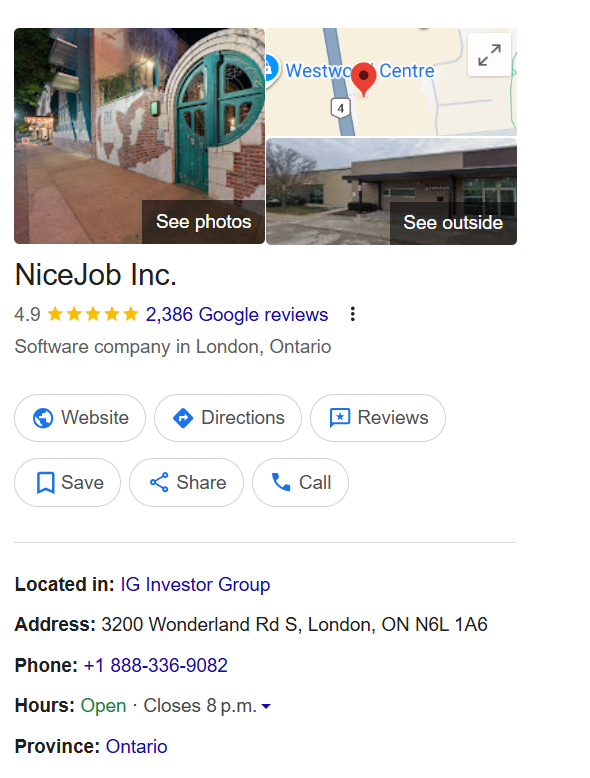
NAP stands for Name, Address, and Phone number, and keeping this information consistent helps make it easier for both customers and Google to understand and trust your business. Google looks at your NAP details across your website, social profiles, and online directories to confirm that everything lines up.
Helpful best practices to follow:
-
Use the same business name everywhere: Stick with one official version of your name and avoid adding extra words or variations across platforms.
-
Keep your address formatting consistent: Match your address exactly wherever it appears. For example, if your website says “123 Main St.” and your Google profile says “123 Main Street, Suite 2,” updating them to match helps avoid confusion. If you have multiple locations, be sure to add each one to your profile so customers can easily find the right location near them.
-
Use a local phone number: A local number can feel more familiar to nearby customers and supports your local presence.
Taking a little time to align these details can go a long way in building trust, improving accuracy, and strengthening your local SEO over time.
3. Write a Clear, Compelling Business Description
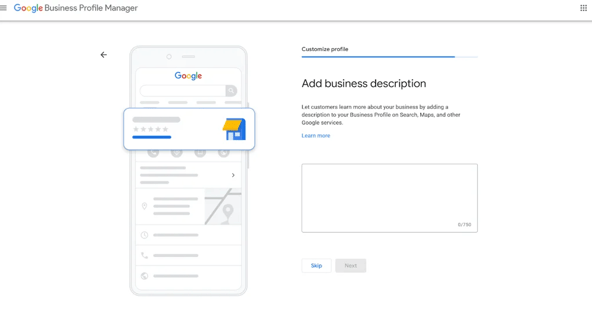
Your business description is a simple opportunity to help potential customers quickly understand what you offer and what makes your business a great fit for them. In just a few lines, it can set expectations, build trust, and encourage someone to take the next step.
Think of it as a friendly introduction rather than a sales pitch. You’re answering two helpful questions for your customers: "What do you do?" and "Why should I choose you?"
Tips for a strong description:
-
Start with a clear overview: Briefly explain what your business does so there’s no confusion.
-
Share what makes you unique: This could be your approach, your experience, or the type of customers you specialize in.
-
Include keywords naturally: Use the words your customers might search for, while keeping the tone natural and easy to read.
-
Keep it up to date: Revisit your description from time to time to make sure it still reflects your services and offerings.
For example, instead of a general statement like “We offer great service,” you could say:“We’re a locally owned wellness spa specializing in personalized facials, therapeutic massage, and results-driven skincare.”
4. Choose the Right Categories
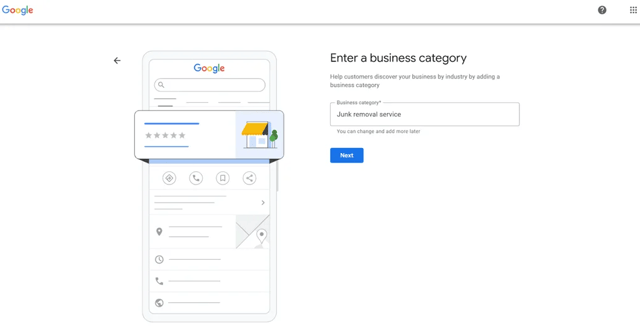
Categories help Google better understand what your business offers, which makes it easier to connect you with the right customers. When your categories are clear and accurate, your business is more likely to appear in searches that match what you actually do.
How to approach categories:
-
Primary category: Choose the option that best represents your main service or area of focus. This helps Google understand the core of your business.
-
Secondary categories: Use these to add helpful context and highlight other services you offer. They should support your primary category and give a more complete picture of your business.
More specific categories can help your profile show up in more relevant searches, but it’s okay to revisit and adjust them over time. As your business grows or changes, updating your categories ensures your profile continues to reflect what customers can expect when they find you.
5. Upload High-Quality Photos Regularly
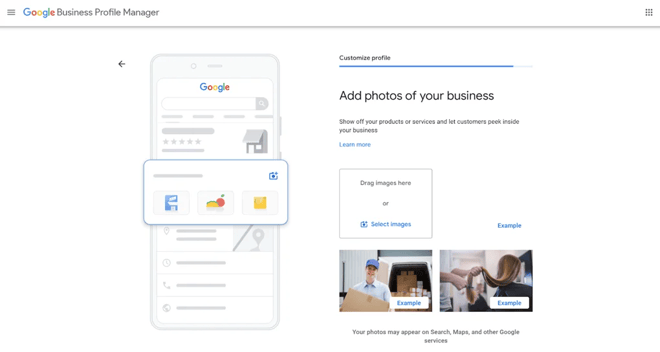
Photos are often the very first thing people notice on your Google Business Profile. High-quality, up-to-date images help customers quickly understand what you offer, what your business feels like, and whether they can trust you.
Types of photos to include:
-
Product images: Highlight your best-selling, most popular, or most unique products. Clear, well-lit photos help customers picture what they’ll get and can spark immediate interest.
-
Service photos: Show your services in action—whether that’s a team on the job, a process step, or a before-and-after moment. These images help customers understand what working with you actually looks like.
-
Team photos: Put faces to your business. Photos of your staff make your brand feel more personal, approachable, and trustworthy, especially for service-based businesses.
Updating your photos regularly also signals to Google and to customers that your business is active, engaged, and open for business.
6. Actively Collect and Respond to Reviews
Did you know that 98% of customers read reviews before making a purchase? That’s why reviews are one of the quickest ways to build trust and credibility with potential customers, while also influencing how your business appears in local search results.
How to get more reviews and boost trust:
-
Request reviews: Politely ask satisfied customers to share their experiences online.
-
Incentivize feedback (the right way): Offer small perks like entry into a draw, discounts on future visits, or a simple thank-you bonus (while always staying within Google’s guidelines.)
-
Simplify the process: Make leaving a review effortless by sharing direct review links in follow-up emails, texts, receipts, and social media posts.
-
Respond to reviews: Taking the time to reply to reviews not only supports your local SEO, but also shows customers that their feedback truly matters. P.S. You can save hours each week by using NiceJob Pro's AI-powered Review Response feature to respond quickly and consistently.
Pro-tip: Make the whole process easier by automating your review requests with NiceJob. Instead of relying on staff to remember to ask or hoping customers follow through on their own, NiceJob automatically sends review requests after each job or visit, while the experience is still fresh. This helps you collect more consistent, high-quality reviews without extra effort, keeping your Google Business Profile active and trustworthy in the eyes of both customers and search engines.
Want to boost your conversion rate?
Learn more about why recent reviews matter and how to consistently get more of them.
Learn More
7. Keep Your Business Hours Accurate
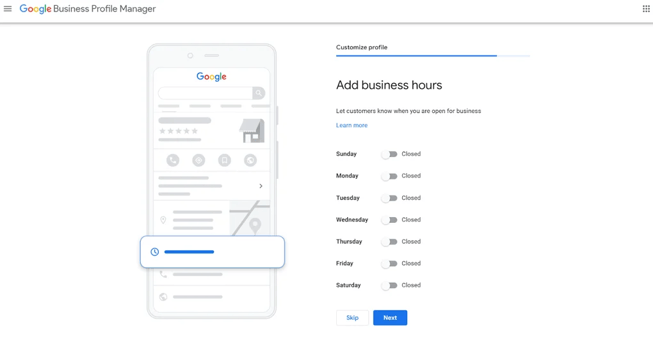
Incorrect business hours are one of the fastest ways to lose customer trust. When someone shows up to a closed location or calls during posted “open” hours with no answer, it creates frustration.
Keeping your hours accurate helps customers plan with confidence and shows that your business is reliable and well-managed.
Be sure to update your hours for:
-
Holiday hours: Adjust your profile ahead of holidays so customers aren’t left guessing about closures or shortened days.
-
Special events or promotions: Let customers know if you’re opening earlier, staying late, or reducing hours for special occasions.
Always double-check that your hours match across your website, social media, and Google Business Profile. Consistency prevents confusion, builds trust, and helps you avoid losing business over something that’s easy to fix.
8. Use Google Posts to Stay Visible
Google Posts are a simple way to share timely updates right on your Google Business Profile, helping you stay visible and relevant when potential customers are deciding what to do next. Think of them as mini updates that keep your profile fresh and show that your business is active and engaged.
You can use Google Posts to highlight anything new or noteworthy, including:
-
Promotions or limited-time offers: Share seasonal deals, special discounts, or short-term incentives.
-
New services or products: Let customers know when you add something new or expand your offerings.
-
Events or announcements: Promote upcoming events, holiday hours, or important updates.
A few examples of effective posts:
-
“Now offering LED light therapy”
-
“Holiday gift cards now available”
-
“Book this week and earn bonus points”
Posts don’t need to be long or complicated. Short, clear updates tend to perform best and are easier for customers to scan quickly. Posting regularly helps keep your profile up to date and gives customers more reasons to choose your business.
9. Monitor and Manage the Q&A Section
The Q&A section on your Google Business Profile is another helpful touchpoint for potential customers. Since anyone can ask or answer questions there, giving it a bit of regular attention helps ensure the information stays accurate and useful.
Staying proactive doesn’t have to be time-consuming. A few simple habits can go a long way:
-
Check the Q&A section weekly: This helps you catch new questions early and spot any outdated or incorrect answers.
-
Respond promptly: Quick, clear replies show that your business is attentive and easy to work with.
-
Add your own FAQs: You can get ahead of common questions by posting answers yourself. Some examples of helpful preemptive questions to add: “Do you offer parking?”, “Do you accept walk-ins?” and “Do you offer gift cards?”
Clear, accurate answers reduce uncertainty and make it easier for customers to take the next step, whether that’s booking, calling, or visiting your business.
10. Use Insights to Improve Over Time
Google Business Profile Insights show how people are finding and interacting with your listing.
Look at metrics like:
-
Search terms customers used
-
Calls, website clicks, and direction requests
-
Photo views compared to competitors
Pair GBP insights with NiceJob’s review and engagement data to get a clearer picture of what’s driving trust, traffic, and conversions.
Google Business Profile insights tell you what customers are doing (how they found you, how many people clicked, called, or asked for directions), NiceJob Insights helps you understand why they’re doing it. NiceJob analyzes both your reviews and your competitors’ reviews at scale, identifying patterns, trends, and recurring themes automatically.
This means you can:
-
Spot strengths customers mention repeatedly (e.g. “friendly staff”, “fast response time”, “great communication”) and lean into those in your marketing.
-
Identify areas for improvement by uncovering common complaints or friction points—even if they’re buried across dozens of reviews.
-
Compare sentiment over time to see whether changes you make are improving customer perception.
-
Understand what drives conversions by connecting review themes with increases in calls, bookings, or website visits from your Google Business Profile.
When you pair Google Business Profile insights with NiceJob’s AI-driven review and engagement data, you get a full picture. Instead of guessing what matters to customers, you can make smarter, data-backed decisions that build trust, improve service, and drive more conversions.
Final Thoughts
Your Google Business Profile isn’t something you “set and forget.” It’s a living, high-impact asset that plays a huge role in how local customers discover, evaluate, and choose your business. The good news is that you don’t need a massive marketing overhaul to see results.
If you’re short on time (and let’s be honest, most business owners are), focus on progress over perfection. Start with the basics: make sure your information is accurate, your reviews are active, and your profile clearly reflects what makes your business great. Then, use insights to keep improving over time.
Want to boost your local SEO?
Download our free Review Boosting SOP to see exactly how top local businesses consistently generate more high-quality reviews.
Free Review Boosting SOP