•
Blog

Growing your Google reviews as a dental practice requires a balance of consistency, compliance, and patient comfort. Reviews don’t just influence perception, they directly affect visibility. The more high-quality reviews your practice earns, the stronger your local SEO becomes, and the more likely you are to appear in Google’s local pack (those top 3 map results patients click first).
Reviews also play a crucial role in patient decision-making—72% of consumers say positive reviews help them trust a local business more.
Below are the most effective and fully ethical strategies to help your practice increase reviews while staying aligned with Google’s policies and healthcare regulations.
To build reviews the right way, it all starts with when and how you ask.
1. Ask at the Right Time
The best moment to request a review is shortly after a positive appointment experience, when the patient still remembers the quality of their care. Common ideal moments include after routine hygiene visits, smooth procedures, or successful first consultations.
Automation makes this easy. Once the appointment is marked complete, a review request can go out automatically by text, email, or a short multi-step sequence (for example, SMS first, then a follow-up email if they don’t respond). You can also reinforce your efforts in-office with QR codes on signage or handouts, so patients can leave a review while they’re still at the practice—without relying on staff to remember to ask every time.
Asking at the right time is your foundation—what follows are two practical ways to put that strategy into practice every day: keeping requests neutral and training your front desk to set expectations.
Keep Review Requests Completely Neutral
Dental and healthcare regulations (along with Google’s policies) don’t allow you to ask for “positive” reviews or offer incentives. Language must remain neutral and optional.
Examples of compliant phrasing include:
- “We’d love your feedback about your visit.”
- “Would you mind sharing your experience with others?”
- “Your input helps other patients feel more confident choosing care.”
NiceJob’s built-in templates follow compliant, pressure-free wording designed for healthcare environments, so your requests stay consistent and on the right side of both regulatory and platform guidelines.
Ethical Tip:
Use neutral, universal outreach. Automated requests should go to all patients equally, regardless of outcome. This helps you maintain fairness, avoid cherry-picking only happy patients, and stay aligned with both healthcare rules and Google’s policies.
Negative feedback doesn’t have to hurt your practice
Learn why you shouldn’t fear negative reviews and prove you listen and improve.
Learn More
Train Your Front Desk to Set Expectations Casually
Your team doesn’t need rigid scripts or pushy language. A quick, friendly mention at checkout can normalize the idea of leaving feedback and increase follow-through once the automated request goes out.
Helpful, low-pressure phrasing includes:
- “You’ll get a short feedback message after your visit.”
- “We really appreciate any feedback you’d like to share.”
This sets the stage for the automated request, lets patients know what to expect, and encourages participation—without creating any sense of obligation or pressure.
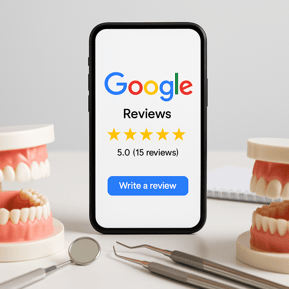
Want proven review request scripts?
Check out copy-and-paste messaging you can adapt for your dental team.
Learn More
3. Make Leaving a Review Effortless
The easier you make the process, the more patients will follow through. Many patients, especially older or tech-limited individuals, won’t leave a review if they must search for your Google profile or navigate multiple steps.
NiceJob solves this by sending:
- One simple, mobile-friendly link
- Direct access to your Google review page
- No searching or extra steps required
Reducing friction significantly increases conversion rates and creates a better patient experience.
4. Use Gentle, Multi-Step Follow-Ups
Most patients intend to leave a review, they just get busy. A single request often isn’t enough, but reminders must stay respectful.
NiceJob uses a warm, ethical sequence that includes:
- An initial request
- A friendly reminder
- A final gentle nudge
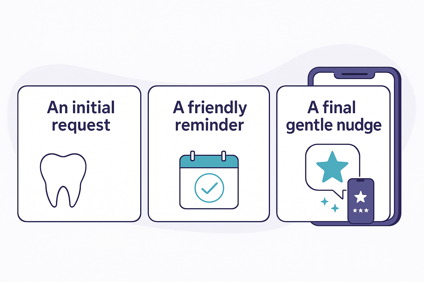
These are spaced appropriately so patients feel encouraged, not pressured.
5. Reply Thoughtfully to Reviews (and Use AI to Make It Easier)
Replying to reviews shows patients that you’re listening, grateful for their feedback, and committed to ongoing care. A simple “thank you” or a calm professional response to a concern, can be the difference between a nervous new patient scrolling past and feeling confident enough to book.
When you respond consistently, you signal that:
- You value every patient’s experience
- Feedback leads to action and improvement
- Your practice is approachable and patient-focused
Keep responses brief, warm, and privacy-safe (no medical details), for example:
“Thank you for taking the time to share your experience—we’re glad to hear your visit went smoothly and appreciate your trust in our team.”
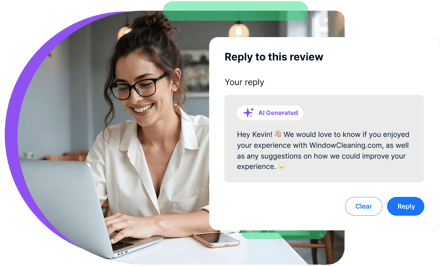
If you struggle to keep up, tools like NiceJob’s AI Replies can help you quickly generate on-brand, professional responses that you can review and approve—so no review goes unanswered, even on busy clinic days.
6. Turn Reviews into Social Proof Everywhere
Showcasing real patient feedback wherever people interact with your practice—on waiting room screens, front-desk displays, or printed materials—creates powerful social proof and makes leaving a review feel like a normal part of the experience.
When patients see others sharing their stories, it signals that “people like me leave reviews here,” building instant trust for new visitors and encouraging more patients to contribute.
You can extend this beyond the office, too.
Use review widgets on your website to highlight recent 5-star feedback and real-time activity, and automatically share standout reviews to your social channels. Pair that with a dedicated review page or microsite that brings all your testimonials together in one branded place. When patients see the same positive proof in your practice, on your site, and on social media, your reputation becomes a consistent, always-on trust signal.
Learn how to turn reviews into powerful social proof
Discover the power of repurposing reviews across your website, social media, and ads.
Learn More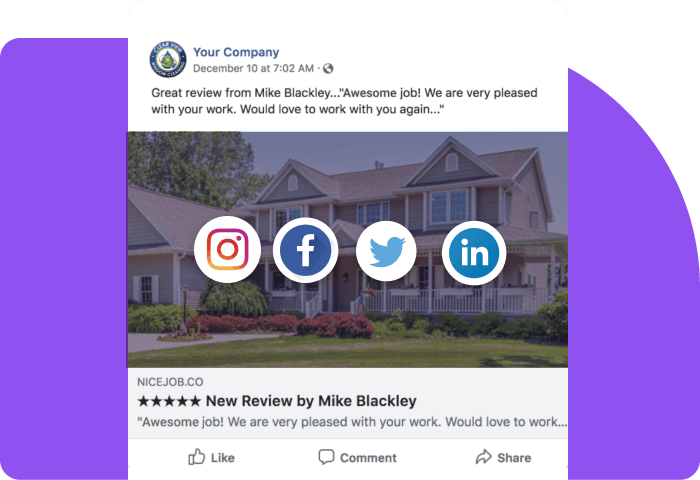
7. Automate the Entire Workflow
Most dental teams struggle with consistency, neutral wording, follow-up timing, and tracking who has (and hasn’t) left a review. The same is true for referrals. Everyone agrees they’re valuable, but no one has time to run a referral program manually.
Automation solves both problems.
With NiceJob, your practice gets:
- Automated, neutral review requests
- Healthcare-compliant message templates
- Multi-step reminders
- One-click Google review links
- Full activity tracking
- Hands-free consistency for your entire team
- Referral automations (via Referrals Pro) that give each happy patient a unique, trackable link to share with friends and family
This creates a predictable, patient-friendly engine that not only grows your review volume ethically, but also brings in a steady stream of new patients through referrals—many of whom will go on to leave their own reviews and keep the cycle going.
Conclusion: Ethical Review Growth Builds a More Trusted Dental Brand
Growing your Google reviews ethically isn’t about asking harder—it’s about creating a fair, consistent system that reflects the quality of care you provide. With automated and compliant tools, dental practices typically see:
- Better local search visibility
- Higher trust from new patients
- A steady flow of fresh feedback
- Reliable long-term reputation growth
- An online image that matches real patient satisfaction
With NiceJob, your everyday appointments become an effortless source of authentic, trustworthy reviews—while staying fully compliant and focused on delivering exceptional patient care.
Turn everyday appointments into 5-star proof of care
Start automating ethical, neutral review requests with NiceJob, so your dental practice earns more reviews without adding more work for your team.
Start Free
.jpg)



.png)