•
Blog

You're halfway through a garage door repair when your phone buzzes in your back pocket. You can't stop to answer, so it goes to voicemail. By the time you're packed up and listening to messages at the end of the day, that caller has already booked with someone else.
Sound familiar?
If you run a home services business, you know this moment well. Calls and website inquiries rarely wait for a convenient time, and the better your reputation gets, the more of them come in while you're on the job or after hours.
So today we’re breaking down why every missed call matters and how AI Leads picks up every call and chat while you and your team are busy getting the job done.
Missed Calls Cost More Than You Think
Our home services customers tell us that about 90% of their leads come in by phone. That's not surprising; when a garage door won't close or the AC quits in July, people typically want to talk to someone, immediately.
The problem is timing. Those calls tend to land while you're on a job or after hours, which creates three headaches at once:
- Hot leads slip away: A ready-to-book customer hits voicemail and calls the next business on the list.
- Cold leads interrupt your work: You stop a job to answer, only to find a tire kicker or a spam call.
- Callbacks happen too late: The end-of-day voicemail review means real prospects wait hours to hear back, and probably aren’t that interested anymore.
And here's the twist: as NiceJob boosts your reputation with more 5-star reviews, your call volume grows. More calls is a great problem to have, but only if you can actually answer them.
How AI Leads Works
AI Leads is more than just an AI receptionist. It answers customer questions in real time, collects the job details you need, and scores each conversation as hot, warm, or cold based on your previous job data. Then it notifies you right away, so you know exactly who to get back to first.
The last thing you need is to spend your evening sifting through voicemails, only to find most of them are cold leads going nowhere. What you really want to know is who needs to hear back from you, and who can wait.
To make that happen, AI Leads gives you two always-on helpers:
- AI voice: a voice agent that picks up your business line when you can't
- AI chat: a web chat on your website that helps visitors with their inquiries and collects their details
Step 1: The Call
When a call comes through, the AI voice agent responds by greeting and assisting the customer with their inquiry. If you want to hear an example of what that sounds like, you can listen to a recording on our AI Leads feature page.
Depending on the inquiry, your voice agent will:
- Confirm that the customer's location is in your service area
- Ask how the customer found your business
- Ask about the customer's budget and timeline
- Answer the customer's questions, as long as that info is in its setup (e.g., pricing or a veterans discount)
- Ask any custom questions you've set up
- Collect and read back the customer's email and phone number to confirm the best way to reach them
The whole exchange takes just a few minutes, leaving the customer with real answers and you with everything needed to follow up.
Step 2: After The Call
Within moments of hanging up, you will get a notification with a quick summary of the customer’s details, the lead score, and why it was scored the way it was. A one-tap button lets you call the customer right back or close the lead if it wasn't a fit.
If you follow the notification link, you can get a detailed breakdown of the entire call, listen to the recording, and/or view the full transcript. You can also give feedback on anything the AI said to improve the quality of the scoring.
Step 3: The Callback
Based on the information that you’ve received and the lead score, you can choose to call the customer back right away to try to secure the booking. After all, when it comes to booking jobs, sometimes speed matters more than pricing.
The result? More leads converted into customers, and a more efficient process for you.
How to Customize Your Setup
To get started with AI Leads, you’ll need to book a session with the NiceJob team. They’ll take care of your connection in about 15 minutes.
From there, our AI reads your website and fills in most of the details for you. What you have to do is look over your business details to make sure everything is accurate. From then on, you can customize your AI voice agent, who gets alerted, and how the notifications get sent.
Here's a more comprehensive list of what you'll review and can customize:
Your Business Details
Services, pricing, service areas, contact info, business hours, and a short description are all pulled from your site. Fill in pricing for every service if you can. The more that’s shared, the better AI Voice and AI Chat answer.
Pro Tip: If your website is light on details, update it before setup. The AI pulls from your site first, so clear service pages, pricing, and service areas mean less manual work later.
Frequently Asked Questions
Think about the questions you answer on almost every call, like whether you offer free estimates, which payment methods you take, whether you have a warranty, or whether you run discounts for seniors or veterans. You can add these as FAQs so that your AI can use it as a knowledge base.
Notifications
Choose who gets alerted and how. A good rule of thumb: send hot and warm leads by text so you see them right away, and route lower-priority calls to email.
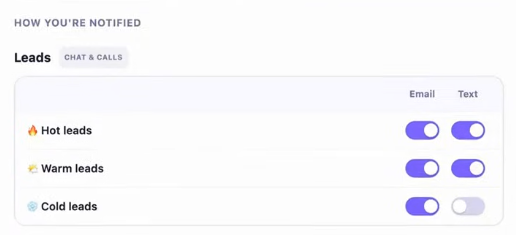
With AI chat, you will only be notified of real leads that come through so you’re not bothered by random questions or someone who opens the chat and leaves.
With AI voice, you can toggle whether you’d like to receive notifications from calls that aren’t leads.
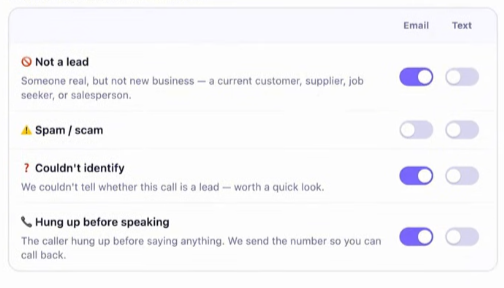
Pro Tip: If you have a teammate who handles scheduling or estimates, add them to hot and warm lead alerts too. Whoever’s free first can make the callback.
Tone, Voice, and Response Time
Pick how your AI voice agent talks and tell it how soon callers can expect to hear back (e.g. within an hour).
There are three tones you can choose from:
- Friendly and Straightforward
- Professional and Detailed
- Casual and Laid-back
And six different AI voices (male or female) for your voice agent. Listen to the options and pick the one that fits your brand best.
Qualifying Questions
The voice agent and web chat will ask for the service needed, name, email, and phone number. You can turn on more questions to sharpen lead scoring and add custom ones specific to your trade, like "What kind of garage door do you have?"
Once everything's set, you can call the number yourself to test it before it goes live.
That’s It
Every call you missed when you were busy getting the job done can now be handled with AI Leads. It gets answered, the customer gets real answers, and you get a scored lead with everything you need to call them back, all before you’ve packed up your tools. Your reputation brings the calls in. AI Leads helps you turn them into booked jobs.
Once you’re through with this lesson’s challenge, remember to give your own line a call to test out the experience!
We’ve got more where that came from
Explore more tips, guides, and resources from NiceJob to get even more from your customer relationships.
Read More