
There are two very different problems that bring people to this page. If you wrote a review and regret it, you can delete it yourself in a few taps. If you own a business and you're looking at a review someone else left, you cannot delete it directly. What you can do is flag it and request removal, but Google decides whether it comes down.
That distinction matters because the steps are completely different, and most guides bury it. In this guide, we’re covering both.
If You Wrote the Review: How to Delete It Yourself
Deleting your own Google review takes about a minute.
Here's how to do it from the Google Maps app:
Step 1: Open the Google Maps app on your phone.
Step 2: Tap your profile photo in the top right corner and select "Your contributions."
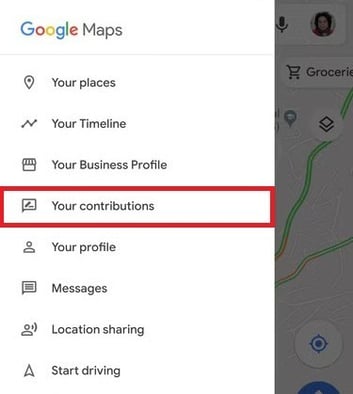
Step 3: Tap "Reviews" to see a list of reviews you've written.
Step 4: Find the review you want to remove, tap the three-dot menu next to it, and select "Delete review." Confirm when prompted.
The review is removed immediately. If you're on desktop, the path is the same: maps.google.com, click your profile icon, select "Your contributions," and navigate to Reviews.
One thing to know: deleting the review removes it permanently. There's no way to archive or unpublish it temporarily.
If You're a Business Owner: How to Flag or Report a Review
This is the harder case. As a business owner, you don't have a delete button. What you have is a "report" or "flag" option that sends the review to Google for evaluation. Google then decides whether the review violates its policies and whether to remove it.
Here's how to flag a review through Google Business Profile:
Step 1: Go to your Google Business Profile at business.google.com and sign in.
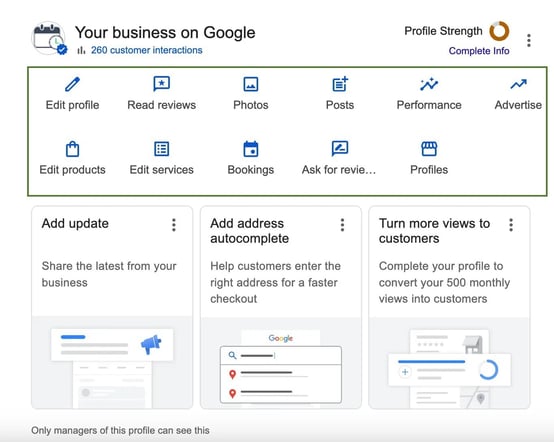
Step 2: Navigate to "Reviews" in the left-hand menu.
Step 3: Find the review you want to report. Click the three-dot menu to the right of the review.
Step 4: Select "Report review."
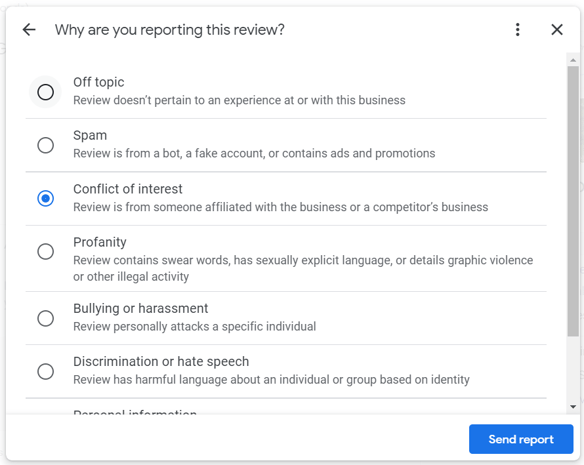
Step 5: Choose the reason that best matches the policy violation, such as "Off topic," "Spam," "Conflict of interest," or "Hate speech", then click "Report."
What to expect after flagging: Google typically takes 3-14 days to review a flagged review, though it can take longer and you won't receive a notification when the review is evaluated. If you check back and it's still there, that usually means Google didn't find a policy violation, not that your report is still pending.
The honest reality: most flagged reviews are not removed. Google's automated systems assess the report first, and only clear violations tend to get actioned quickly. Vague, negative reviews that feel unfair almost never qualify for removal under Google's current policies.
Which Types of Reviews Google Will Actually Remove
Google's content policy does define categories of reviews it will remove. The key word is "will" rather than "might", and these are the cases where removal is genuinely possible:
- Spam or fake reviews: Reviews that appear to come from automated accounts, or that are clearly fabricated, particularly if the reviewer has no history of real activity.
- Conflict of interest: Reviews from current or former employees, competitors, or anyone with a personal stake in the business's reputation.
- Off-topic content: Reviews that describe an experience at the wrong business or that contain no reference to an actual transaction.
- Hate speech or offensive content: Reviews that target protected characteristics, use slurs, or include content that violates Google's hate speech policy.
- Personal information: Reviews that include names, phone numbers, or other private data about individuals.
- Illegal content: Reviews that contain defamatory statements provably false as a matter of law, or that describe illegal activity.
What Google will not remove based on flagging alone: negative opinions, low star ratings with no written content, vague complaints that feel unfair, or reviews from real customers who simply had a bad experience. Those are frustrating, but they're protected under Google's policy even when they feel wrong.
How to Dispute a Google Review Formally
If you've flagged a review and it wasn't removed, you have a few escalation options. None of them are fast, and not all of them work.
Escalate through Google Business Profile support. In your GBP dashboard, you can contact Google support directly and explain why the review violates policy. This gets a human set of eyes on the issue rather than relying entirely on automated review. Be specific: cite the exact policy clause you believe is violated and provide any supporting evidence (such as records showing the reviewer was never a customer).
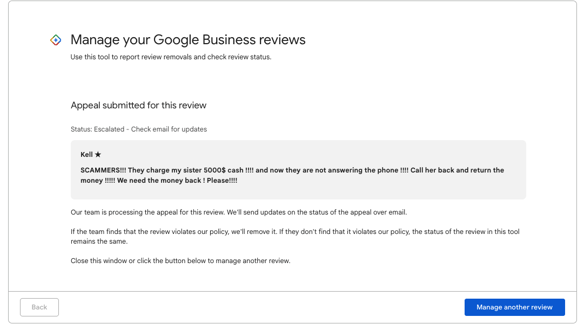
Use Google's legal removal request. If a review contains defamatory content that is false as a matter of law, you can submit a legal removal request through Google's legal support form at support.google.com/legal. This process is slow and requires documentation, however it's the appropriate path when the content crosses into genuine defamation rather than just a harsh opinion.
Contact a reputation law attorney. If the review is causing material business harm and is provably false, some attorneys specialize in online defamation. A cease-and-desist letter sent to the reviewer directly can sometimes resolve the issue outside of Google's process entirely.
None of these paths come with a guarantee, and the legal route in particular is expensive relative to the outcome for most small businesses. For most home service companies, the more practical answer is no removal at all.
What to Do When Google Won't Remove a Review
For most disputed reviews, Google won't act, and since that's the likely outcome, it's worth planning for it.
Respond to the review publicly: A thoughtful, professional response does two things: it signals to future customers that you take feedback seriously, and it gives context to anyone reading the negative review. The response doesn't need to be defensive. A short acknowledgment of the concern and an invitation to resolve it offline is usually enough. For templates and real examples, see how to respond to a negative review the right way.
Build more reviews to dilute it: A single two-star review sitting among three total reviews is doing real damage. That same review sitting among 80 reviews averaging 4.8 stars is essentially invisible to a prospective customer. Review volume matters for both perception and SEO. Google's ranking algorithm treats review recency and volume as ranking signals, and more recent positive reviews can offset older negative ones over time.
Get ahead of it with a review system: Waiting for customers to voluntarily leave reviews after a bad experience means your review profile tends to skew negative. Customers who are unhappy are more motivated to leave a review than customers who are satisfied. A consistent outreach system flips that dynamic by prompting satisfied customers at the right moment.
Negative reviews are also both a reputation and SEO issue. If you’re interested in a broader look at how your review profile affects search visibility, we have a piece on SEO reputation management.
Frequently Asked Questions
Can you pay Google to remove a review?
No. Google does not offer any paid review removal service for businesses. Anyone claiming to offer "guaranteed Google review removal" for a fee is either misleading you or operating in ways that violate Google's terms of service. The only legitimate removal paths are flagging, formal escalation, and legal action in cases of defamation.
How long does it take for a flagged review to be removed?
Google's stated timeline is 3-14 days, but many reviews remain up indefinitely after being flagged. If the review is still there after two weeks, Google likely did not find a policy violation in its initial review. You can try re-flagging with a different policy category or escalate to Google Business Profile support.
Can a business owner delete a Google review?
No. Business owners cannot delete reviews left by others. The only person who can delete a review is the person who wrote it. Business owners can flag reviews for Google to evaluate, respond to reviews publicly, and escalate disputes through support or legal channels.
Do negative Google reviews affect your search ranking?
Your overall rating and review volume do factor into local search ranking. A consistent pattern of low ratings can affect how often your business appears in local results, particularly in the Google Maps pack. However, a single negative review among many positive ones typically has minimal impact on ranking. Consistent, recent positive reviews carry more weight than any individual negative one.
The best response to a negative review is making it irrelevant
NiceJob automates review requests so you consistently build a 5-star reputation.
Start Free