•
Blog

Last Updated: May 2026
Running a franchise puts you in a genuinely strong position. You have brand recognition, operational infrastructure, and a proven business model. The final piece of the puzzle is a strong local search strategy, and it requires a different approach than what works for a single-location business. Once you understand why, the path forward becomes clear fast.
Google ranks each location individually, not the franchise as a whole. Your brand name carries weight with customers who already know you, but for local search, each of your locations competes on its own merits: its own Google Business Profile (GBP), its own local reviews, and its own website presence.
Understanding what you can do as a franchise owner helps you focus your energy more clearly so you can build strong local rankings across every location.
Where to Start: One Google Business Profile Per Location, Done Right
Every location needs its own Google Business Profile—fully optimized and individually managed. A single corporate listing or a shared profile across multiple locations won’t get your locations ranking locally.
Google’s local search algorithm checks three things: relevance, distance, and prominence. Your GBP is the primary signal for all three. It accounts for 32% of local pack ranking factors, making it the single most important element of your online visibility.
Why Your GBP Matters
What’s shifted recently is the evolution of Google Business Profile beyond a business listing. The difference between home service businesses ranking at position one and those at position four or five comes down to behavioral and engagement signals: post activity, fresh photos, review velocity, and accurate NAP information.
A good local SEO strategy for franchises starts with an individual profile for every location and needs its own ongoing activity.
Once you’ve optimized your GBP, here’s what you need to know for franchise listings:
-
Location-specific URL: Link each profile to that location’s dedicated page on your website, not the homepage. When a customer in Chicago clicks through your Chicago listing and lands on a page built for Chicago, Google reads that as a strong match.
-
Verification and ownership: Each location needs to be verified under your ownership, not just claimed. If the franchisor owns your listing, request that access be transferred (under Location Groups) or that you be added as an owner.
Granting that access lets the local service team capture impactful signals (reviews, photos, post activity, service updates, review responses) that help win a top position on the local map pack and get seen when people search nearby.
👉 Check out our complete guide on fully optimizing your Google Business Profile.
How to Build Location Pages for Franchises
Once your Google Business Profile listings are set up, each one needs to link to a dedicated location page on the franchise website. Getting this structure right is what lets multiple locations coexist and rank well without working against each other.
Have One Domain with Multiple Location Pages
The strongest setup is one authoritative domain with a clean location page structure underneath it, not separate websites for each location. Multiple standalone websites split up your domain's "power" (authority), making each site weaker in search engine rankings. Consolidating into a domain with well-organized location pages gives each page a stronger foundation for search rankings.
The URL pattern should be consistent and logical, like “yourfranchise.com/locations/city-name”. This structure clearly tells Google which page represents which location, and removes any confusion about what should rank where.
Make Each Location Page Genuinely Unique
The most common location page issue is identical copy across every location page, with only the city name swapped out. Google now detects nearly duplicate content well and won’t rank it over one that's clearly written for a specific city.
A genuinely local page benefits from content that could only be written about that specific place.
Share what makes a location page about that particular city unique:
-
Location-specific service information: If a location serves a particular set of neighborhoods, has different hours, or offers anything that varies from other locations, include it here.
-
Local FAQ section: Think about the questions a customer in that particular city would ask. The answers make the page more useful and give AI systems specific, structured content to reference.
-
Reviews from that location: When customers leave reviews on the correct Google business profile, and that content appears on the location page through an embedded review widget, it reinforces the page's local credibility with both search engines and potential customers.
One of the most common review situations in multi-location businesses is customers leaving a review on the corporate listing or a different location instead of the local one. That review still reflects well on the brand, but it doesn't build the local rankings of the location that earned it.
The fix is straightforward: every review invite should use the direct review link for that specific location's GBP. That's the link that goes into your request and follow-up.
👉 Generate your local Google review link now to start getting reviews for the right profile
Review Strategy at Franchise Scale
Reviews influence your local map pack rankings, build customer trust, and increasingly, feed directly into AI-generated search recommendations. For a franchise SEO strategy, the same review-building challenge exists at each location independently, so the strategy needs to be systematic and location-specific.
Remember that Google ranks locations, not the brands themselves. So, your location’s star rating and review velocity—the consistent rate of your business getting new reviews—will matter much more than the total review count. The signal Google reads is whether a business is actively serving customers right now and how good that customer experience is, which is better determined by star ratings and review velocity.
The most reliable review strategy ties the ask directly to the customer interaction, so it happens every time without relying on anyone to remember. This is where tools built for review automation create a real operational advantage. NiceJob integrates with 1,000+ field management software and CRMs, triggering a review request automatically after a job completion. For your home service business with multiple locations, NiceJob connects each location to its own review page.
How Local SEO Feeds AI Search in 2026
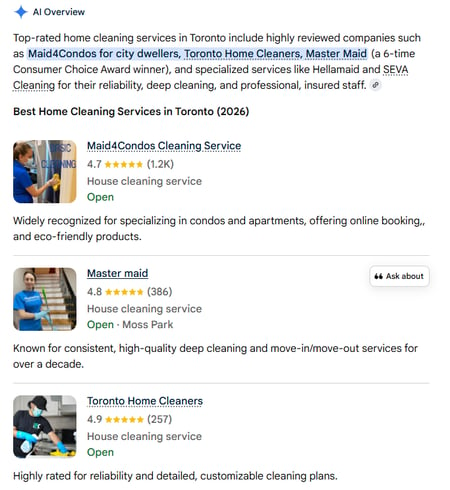
Local SEO is evolving in a way that rewards franchise owners who have their digital foundation in order. More local searches, like “best home cleaning service near me”, are getting an AI-generated answer sourced from Google Business Profile content—reviews, NAP, website, and the consistency of your information across the web.
For a franchise with multiple locations and different people managing various pieces, small inconsistencies can add up over time. If your GBP shows you’re operating between 9-5 and your website says 8-6, Google’s AI may skip recommending your business for an “what’s open now?” search. Consistent, accurate data across every platform is what earns you the recommendation.
AI-generated answers also draw on what customers consistently experience and ensure that it matches what the user is searching for. Specific details (service type, location, context) provide potential customers with better insights into your service and help AI systems evaluate your service more effectively.
Example:
-
Less helpful: "Great cleaning team!"
-
More helpful: "They did a deep clean on our townhouse in San Francisco before our move, and it was spotless!"
The same need for specific content also applies to your responses to customer reviews and each business profile. The more complete, consistent, and specific your online presence is, the more confidently AI surfaces your locations in AI summaries.
How to Build a Scalable Franchise SEO Governance Model
Franchise SEO scales well when there’s a clear system behind it. Here’s the framework to build it on.
Step 1: Establish Google Business Profile Standards
Set clear guidelines for every listing across your locations and document them somewhere every franchise owner can reference:
-
Exact business name format (one version that’s used everywhere)
-
Primary and secondary categories (set at the corporate level, but should be consistent across all locations)
-
Minimum of 10 photos at launch (exterior, interior, completed work, and team)
-
Link to the correct location page URL (each profile must link to its matching page)
-
Local phone number for each listing
-
Complete service list with individual descriptions
Use location groups in the GBP Manager to organize your listings. This allows franchisees to manage day-to-day engagement: responding to reviews, uploading photos, and updating posts.
Step 2: Build Location Pages to a Consistent Standard
Every page should follow the same structure, but also be specific to its particular location.
Use this as your checklist for each page:
-
Clear URL: /locations/city-name
-
NAP in plain text (full name, address, and phone number—matching the GBP exactly)
-
Service area neighborhoods listed
-
Location-specific content (FAQ, embedded Google Maps, link to GBP)
-
Embedded reviews widget with location-specific data
These steps are important for two reasons. First, they help your franchise appear higher in local search results. Second, they give AI systems relevant information in a structured format, so it can be directly used in AI-generated summaries.
Step 3: Make NAP Consistent Everywhere
NAP (name, address, phone number) needs to be identical across your GBP profiles, your website, other review platforms, and every business directory your business appears in. Every detail should be the same. From how the address is written to whether you used dashes or dots in the phone number.
Since you’re operating multiple locations, start with a master NAP spreadsheet. This document can make it easy for anyone managing listings or updating information to ensure consistency.
Step 4: Set Up a Review Collection System (Per Location)
Each location needs a review process that runs on its own and routes to the right review page. The goal is a consistent flow of recent, specific reviews.
For home service businesses, the best time to ask for a review is right after a job is completed. NiceJob sends a review request right after the job is marked complete in a field management software, using a direct review link for that particular location's review page. Each location operates independently within the system, so reviews always go to the right place.
Step 5: Complete Monthly and Quarterly Checks
What should be checked every month, per location:
-
Review velocity: Is each location collecting a consistent flow of new reviews? (Review automation software provides detailed insights about each location.)
-
GBP engagement metrics: Monitor your performance through profile views, direction requests, and calls—it’s available for free on GBP Insights.
-
Respond to all new reviews: For timeliness and consistency, use AI-powered automation to respond to customer reviews.
-
Publish 2-4 posts on GBP: Post seasonal content, before-and-afters, or local highlights.
What should be checked every quarter, per location:
-
Check NAP data: Conduct a NAP audit across major review platforms.
-
Review location pages: Check for anything outdated. Add new services or neighborhoods if needed.
-
Complete a photo refresh: Add new content and remove anything outdated.
These checks stop small inconsistencies from becoming big problems. Fixing a minor data mismatch on one platform prevents a huge cleanup project across all major platforms and franchise locations.
One less thing to manage on your own
NiceJob fits directly in your franchise workflow—automated review collection across every location.
Explore Now
Frequently Asked Questions
Should each franchise location have its own website?
No, and here’s why: separate websites split your domain authority, weakening each one individually. The stronger setup is one domain with dedicated location pages. Each page should have relevant, useful, and city-specific content.
How many reviews does a location need to rank in the local pack?
There’s no total number to achieve. What matters more is review velocity—a consistent flow of new reviews. On the customer trust side, aim to keep each location above a 4.2-star rating. A steady stream of new reviews with a strong rating is the minimum baseline. Check your local competitors as a real benchmark.
Can corporate manage Google Business Profile (GBP) for all locations?
Yes, but GBP Manager supports location groups, which allows franchisees to get limited access to respond to reviews, upload photos, and publish posts without tampering with core listing data. Make full use of the access you have at the franchisee level to boost your local rankings.
How do you prevent franchisees from going rogue with their Google Business Profile (GBP) listings?
Set up location groups in GBP Business Manager and add role-based permissions. Owner-level admins at the corporate level can change categories, addresses, and core listing information. Franchisees with manager-level access can engage actively with the listing without touching the foundational data that needs to stay consistent.